Peter’s Source-Connect Logo Design & Voiceover Housecleaning
Unless I told you, you’d never notice.
But I’m telling you anyway because (a) it’s funny, and (b) it involves me making fun of myself—which is always a crowd-pleaser around here.
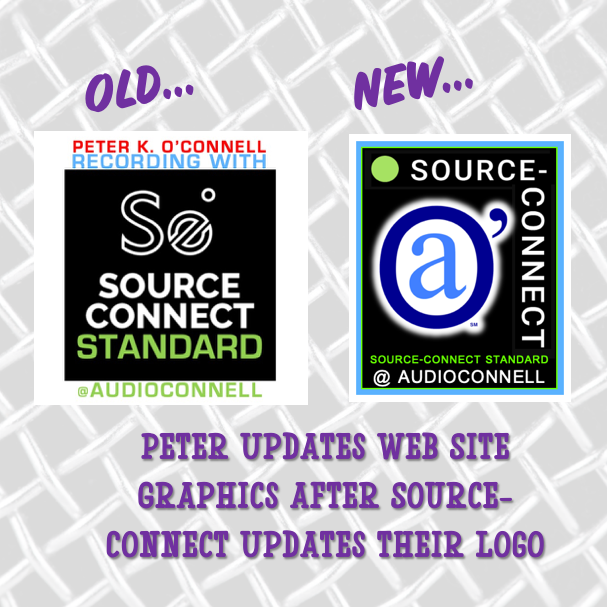
So, here’s the scoop: Source-Connect (a must-have software in pro voiceover and audio recording studios like mine) updated their logo design.
Why care?
Because Source-Connect is the industry standard for real-time, high-fidelity remote audio recording. It’s how voiceover studios like mine connect with producers worldwide. The “Standard” version—yes, that’s literally the name—is what most serious voice talent use.
Now, the Source-Connect team? Brilliant at software. Less so at logo design — but who cares because the software rocks.
But the branding does make a difference to me because I use a co-branded Source-Connect-audioconnell icon across my website to:
-
Show I have the software (which makes audio producers happy)
-
Show I have the Standard version (again, happy audio producers)
-
Show my Source-Connect username so clients can find me easily (happy, happy, happy)

Old Source-Elements / Source-Connect logo for “Standard”
The old S-C logo not awful, it was just “meh,” and the new one? A green dot and san serif font. Not awful. Just… bland again. More minimalistic I guess.
But, if S-C changed their look, I had to update mine for my website.
A small request to Source-Connect HQ: Could you PLEASE offer downloadable logo buttons in various formats? Save graphic designers (and fake ones like me) from reinventing your branding. There are a variety of us who have created these icons for our website…wouldn’t it be better if it was all at least a little bit unified?
Well time for me to go full graphic design DIY lunatic on a different voiceover logo.
My original redesign attempt on Day 1? Looked like digital compost. A black bar with words. Yikes. No I’m not showing you.
I was stubborn. I kept tweaking…

The Source-Connect Green Dot
By Day 2, here’s what I realized:
-
My brand uses a lot of blue
-
Source-Connect’s look is black + white + green dot
-
My first icon had zero connection to my branding (#fail)
So I tried again:
-
Added a blue frame to match or at least tie -in my branding with Source-Connect’s look in a complimentary way
-
I inserted a subtle green line to nod to SC’s new dot (mine’s a bit brighter in color—shhh)
-
The new Source-Connect logo is one long line and I couldn’t find any variations on it so I improvised a variation of my own, keeping the “Source” with the dot at the top to be eye catching and the “Connect” shifted 90 degrees on the right hand side but still very readable
-
I popped in my audio’connell mark with a white glow – that turned out better than I expected
-
I included “Source-Connect Standard” and my username in a close-enough font (font matching AI let me down)

The co-branded icon for audio’connell Voiceover Talent and Source-Connect 2025
Any professional graphic designer would roast my latest co-branded icon like a marshmallow at summer camp.
And they’d be right. But hey—nobody got paid, and I got a customized, semi-functional logo design update for my voiceover website that works just fine.
Who’s laughing now, graphics nerd?
(Still you? Yeah, fair.)